

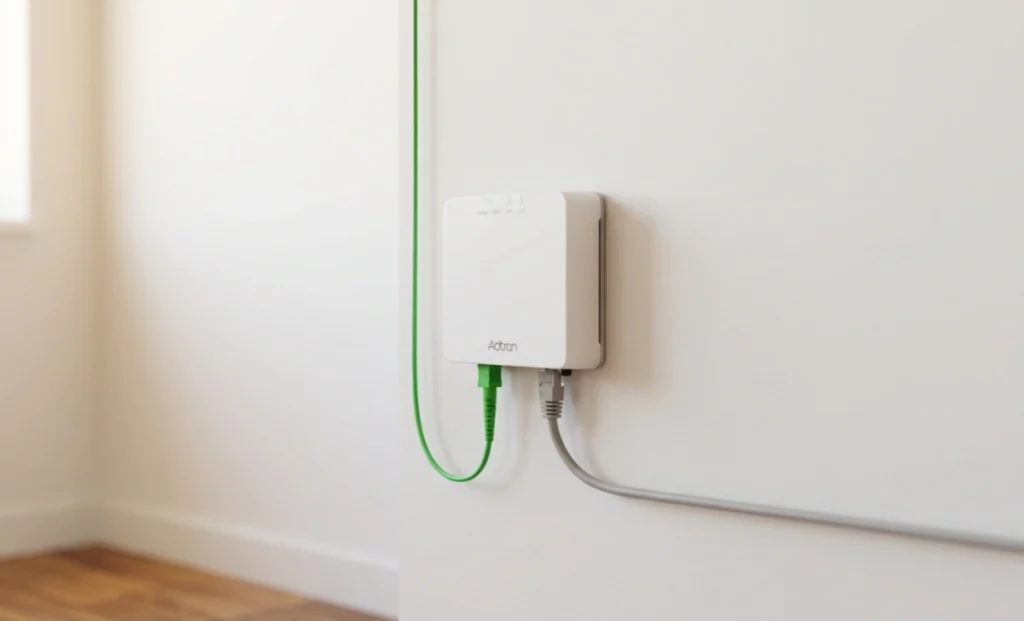
The Adtran box plugged into the wall is an Optical Network Terminal (ONT). Your internet provider installs it when setting up fibre service. It converts fibre-optic light signals into standard Ethernet that your router can use. It does not provide Wi-Fi on its own. Without it, your fibre internet connection cannot work.
You moved into a new home. The technician left. And now there is a small white box mounted to your wall with a green cable going in and an Ethernet cable going out. No label. No manual. Just blinking lights.
If you have been searching “what is the Adtran box plugged into the wall,” you are in good company. Millions of homeowners with fibre internet have the same question. This guide explains what the device is, what it does, why it is on your wall, and what you should and should not do with it.
What Is the Adtran Box Plugged Into the Wall?
The Adtran box is an Optical Network Terminal, commonly called an ONT. Adtran is the manufacturer. The ONT is the device your internet service provider (ISP) uses to bring fibre internet into your home.
Providers, including AT&T Fibre, Frontier, Sonic, and CenturyLink, commonly use Adtran-branded ONTs. When a technician activates your fibre service, installing this device is one of the first steps. It sits at the point where the fibre line enters your home and acts as a bridge between your provider’s network and your personal devices.
Think of it this way: fibre-optic cables carry data as pulses of light. Your router does not speak that language. The Adtran ONT translates those light signals into electrical Ethernet signals your router understands. That is its entire job, and it does it quietly every second your internet is running.
How the Adtran ONT Actually Works
Fibre-optic cables are made of thin glass strands. Data travels through them at extremely high speeds, carried by light rather than electricity. This is what makes fibre faster and more reliable than older cable or DSL connections.
When that light signal reaches your home, it enters the Adtran ONT through a green port, usually on the back of the unit. The device converts the signal from light into an electrical format. It then sends that converted signal through an Ethernet cable to your Wi-Fi router.
Your router takes over from there. It broadcasts the connection wirelessly to your phone, laptop, smart TV, and any other device in your home. The ONT and the router are two separate devices with two separate jobs. The ONT handles conversion. The router handles distribution.
Without the ONT completing that conversion step, the router would have no signal to work with. Your internet would simply not function.
Why It Is Mounted on the Wall
The placement is intentional. Fibre cables are more delicate than standard copper cables and should not be bent, coiled tightly, or moved often. Mounting the ONT keeps the fibre cable entry point fixed and stable.
The box is typically installed close to where the fibre line enters your home. That might be a hallway, utility closet, basement, or garage wall. The exact location depends on where your ISP ran the exterior cable.
Keeping it wall-mounted also protects it from physical damage. A device sitting on the floor is far more likely to get knocked, stepped on, or accidentally unplugged. Wall mounting keeps the installation clean and consistent.
The ONT also needs a constant power source. You will almost always find it near an electrical outlet, since it requires power to convert signals. If your power goes out, your internet goes out too, even if your router has battery backup.
Adtran ONT vs. Modem vs. Router: Key Differences
This is where most homeowners get confused. These three devices look similar but perform very different functions.
| Device | Signal Type | Provides Wi-Fi | Installed By |
|---|---|---|---|
| Adtran ONT | Fibre (light to Ethernet) | No | ISP technician |
| Cable/DSL Modem | Coaxial or phone line | No | ISP or homeowner |
| Wi-Fi Router | Ethernet to wireless | Yes | Homeowner |
A traditional modem works with cable or DSL connections. It converts signals from a coaxial or phone line. The Adtran ONT serves the same gateway role but for fibre-only connections.
You cannot replace your Adtran ONT with a standard modem. The two devices handle completely different signal types. Your ISP owns the ONT, programs it to their network, and is responsible for maintaining it.
The router is the only one of the three you likely own yourself. It plugs into the ONT and creates the wireless network inside your home.
Common Adtran Models and What the Lights Mean
Several Adtran ONT models show up regularly in homes across the US. The most common include the Adtran 411, Adtran 424RG, and the newer Adtran SDX 600 series, which is designed for gigabit and multi-gig fibre plans. The model number is usually printed on a sticker on the bottom or side of the unit.
Each model has indicator lights on the front. Here is what the most common ones mean:
- Power light (solid green): The unit is receiving power and is on.
- PON or Optical light (solid green): The fibre signal from your ISP is connected.
- LAN or Ethernet light (solid or blinking green): Data is passing to your router.
- Any red or amber light: Something is wrong. Check the cable connections, or contact your ISP.
If all lights are off, the ONT has lost power. Check the power cord and the outlet. If the lights are on but you have no internet, try restarting your router first before assuming the ONT is faulty.
Can You Unplug or Restart the Adtran Box?
A brief unplugging to restart the ONT is fine and is actually a standard troubleshooting step. Unplug it from the power outlet, wait 30 seconds, then plug it back in. The device will take one to three minutes to reconnect to your ISP’s network.
Moving the ONT to a different location is a different matter. Because it connects to the fibre cable entry point, relocating it usually requires a technician visit. You should not try to reroute the fibre cable yourself. Fibre strands can break or degrade if bent at a sharp angle.
Never unplug the green fibre cable from the ONT. This is the cable connecting your home to your provider’s network. Disconnecting it should only be done by a trained technician.
If you believe your ONT is faulty or damaged, contact your ISP. Because the provider owns the device, repair and replacement are their responsibility, usually at no cost to you.
Where Fibre Internet Stands Right Now
The Adtran ONT is becoming a more common sight in American homes. According to the Fibre Broadband Association’s 2024 Fibre Deployment survey, fibre now passes 56.5% of U.S. households, with 10.3 million new homes reached in 2024 alone, setting a new annual record.
That growth is expected to continue. As of the end of 2024, nearly 80 million U.S. homes had access to fibre, up from approximately 60 million in 2022.
Consumer sentiment reflects this shift: 65% of internet users now consider fibre the best connectivity option available. That means more households will encounter an Adtran ONT on their wall in the coming years.
What You Should and Should Not Do With the Adtran Box
Knowing what to do and what to avoid will save you a service call and protect your connection.
Do:
- Restart it by unplugging and replugging if your internet drops unexpectedly.
- Check the indicator lights to identify the problem before calling support.
- Keep the area around it clear for ventilation.
- Contact your ISP if you notice physical damage or persistent red lights.
Do not:
- Unplug the green fibre cable under any circumstances.
- Move or relocate the unit without a technician.
- Cover it with anything that blocks airflow.
- Attempt to open or modify the device. It is your ISP’s property.
If you are moving and want the internet transferred to a new address, your ISP will install a new ONT there. The one at your current address stays with the property.
How the Adtran Box Fits Into Your Full Home Network
Your home internet setup has three main parts, and understanding where each one fits will help you troubleshoot faster.
- Fibre cable from the street: Carries your ISP’s signal as light into your home through a small junction on the outside wall.
- Adtran ONT (the box on your wall): Converts that light signal to Ethernet.
- Your Wi-Fi router: Receives the Ethernet signal and broadcasts wireless internet throughout your home.
If your internet goes down, this chain helps you pinpoint the issue. Start by checking whether your router has power and is connected to the ONT. If the ONT’s optical light is off or red, the problem is on your ISP’s side. Call them. If the ONT lights are normal but your router is not broadcasting, the issue is with the router.
This simple flow saves time and avoids unnecessary service calls in either direction.
FAQs
Is the Adtran box the same as my router?
No. The Adtran ONT and your router are separate devices. The ONT converts the fibre signal to Ethernet. The router broadcasts the Ethernet connection as Wi-Fi. You need both for wireless internet.
Do I own the Adtran box?
In most cases, no. Your ISP owns it, installed it, and is responsible for maintaining it. If it fails, call your provider. Do not attempt repairs yourself.
Why does my Adtran box have a phone jack?
Some models, particularly the Adtran 411 and 424RG, include a phone port to support landline service over fibre. If you do not have a landline, you can ignore it. It will not affect your internet.
Can I move the Adtran box to another room?
Not without a technician visit. The ONT must connect to the fibre entry point in your home. Moving it requires rerouting the fibre cable, which should only be done by a trained professional.
What should I do if my Adtran box has a red light?
First, restart the unit by unplugging it for 30 seconds. If the red light returns after a restart, the issue is likely on your ISP’s network, not in your home. Contact your provider and report the specific light pattern you see.
